How Developers Are Shipping Software Faster With AI in 2026
Ask any developer who has been around for more than five years and they will tell you the same thing. Getting a feature from idea to actually live used to feel like running through sand. You had the idea on Monday, spent most of the week turning it into something close to a plan, then coding started the week after. After that came QA and staging. Deployment was the final hurdle, and it somehow always found a way to break something. By the time anything went live, half the original enthusiasm was gone.
Solo developers and small teams felt that friction in a specific way. Each extra day stuck in the pipeline was a day you were not learning anything real. No user feedback. No revenue signal. Just waiting. And the frustrating part is that none of it was a skill problem. The process itself was just built to be slow. It was just how the process was built.
In 2026, that process looks pretty different. Not because developers are somehow writing better code or working longer hours, but because the dead space between stages has started to shrink. The hours you used to lose to research before planning, to boilerplate before building, to test writing before shipping, to server setup before anything was live, those gaps are smaller. And when you add them all up across a full cycle, you end up with a genuinely different pace. Teams that needed two weeks to ship a feature are doing it in two days. People who thought they needed a team of four are shipping solo.
This is not the “AI will replace developers” conversation. It is a more practical one: here is where the time actually goes, and here is what is different now. We will walk through all five stages, from the first planning conversation to what happens after launch, and look at what AI is actually doing at each one.
One thing worth knowing upfront: a lot of this is only possible because cloud infrastructure changed alongside the tooling. As covered in this overview of cloud computing in modern software development, the move to cloud-native platforms is what made AI-managed infrastructure practical in the first place. Without that shift underneath, the deployment stuff especially would not work the way it does now.
STAGE 1: Planning Without Burning Out
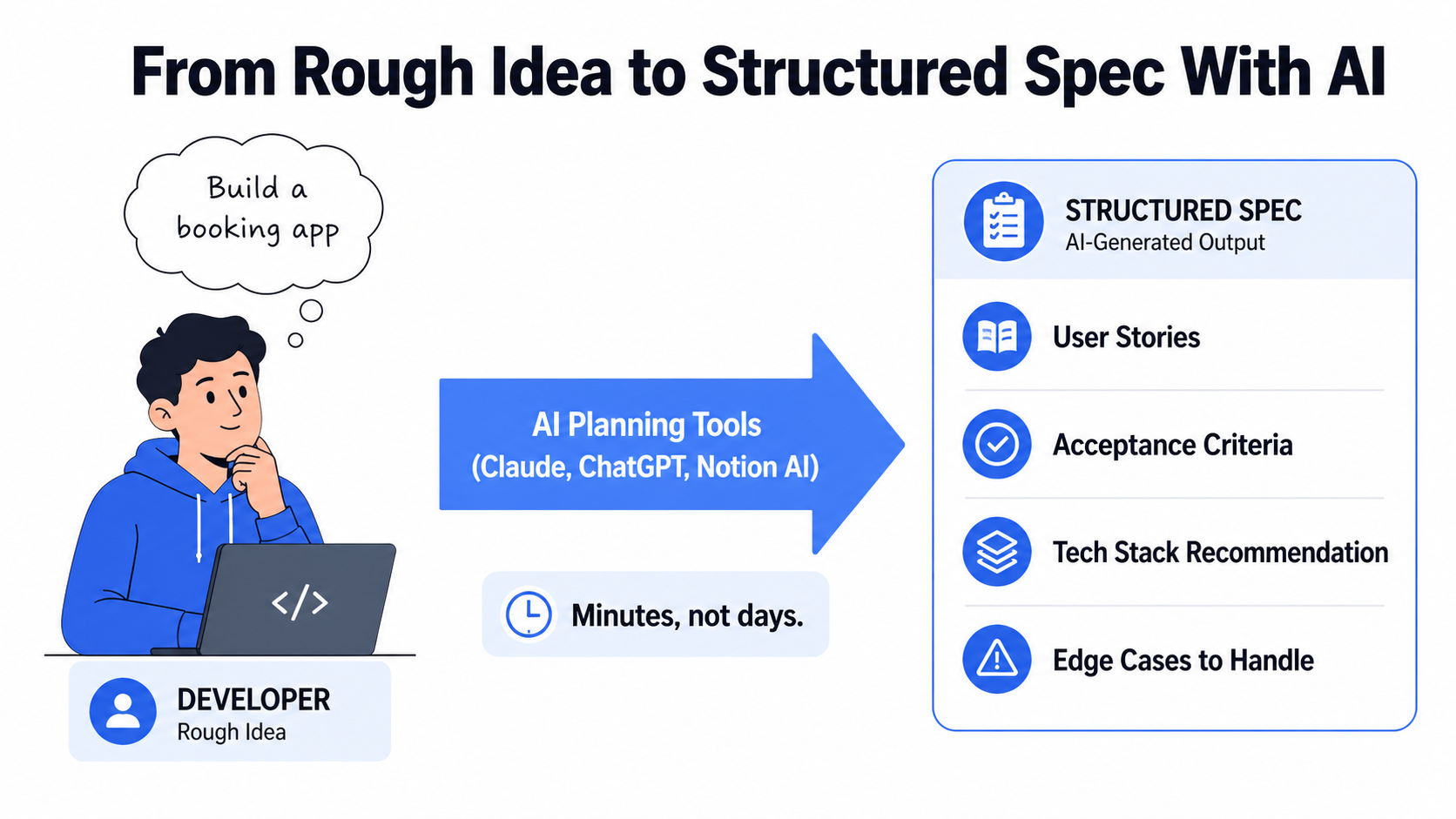
Here is something every developer has lived through. Someone comes in with a great idea on a Monday and wants it built by Friday. You explain that before anyone touches code, there is planning to do. User stories to write. Stack decisions to make. Architecture to sketch out, at least loosely. And if you are working by yourself without a dedicated product manager, all of that lands on you before you can even open your editor.
It used to burn through days. Not because the work was complicated exactly, but because it was spread across a dozen small decisions that each needed their own round of research. What database makes sense for this? Should this be a monolith or are we going to regret that in six months? What framework can we actually maintain long term? For each of those you would end up spending an hour on documentation, another hour on forum threads, and still come out the other side not fully confident in the answer.
That part has genuinely gotten faster. Drop a rough description of what you are building into Claude or ChatGPT and within a few minutes you have something structured to work with. User stories broken down by who is doing what. Acceptance criteria that actually make sense. A stack recommendation with real reasoning behind it, not just “it is popular.” A list of edge cases you likely would not have thought of until they bit you in week three.
Is it always right? No. You will read through it and move things around. Some suggestions will not fit your situation at all. But you are editing a draft instead of building from nothing, and that changes how the morning feels.
The architecture conversations happen faster too. Instead of climbing through documentation for two hours just to get informed enough to make a call, you can have that conversation in fifteen minutes and get a take that is actually specific to your project rather than a generic best practice post from 2019. You are still the one deciding. The AI just does the legwork so you are not spending your morning reading forum arguments from 2019.
Work starts earlier, the spec is tighter, and you are not having that painful sprint-three conversation where everyone looks at a decision and nobody can remember who made it or why.
STAGE 2: Coding Faster With Automation
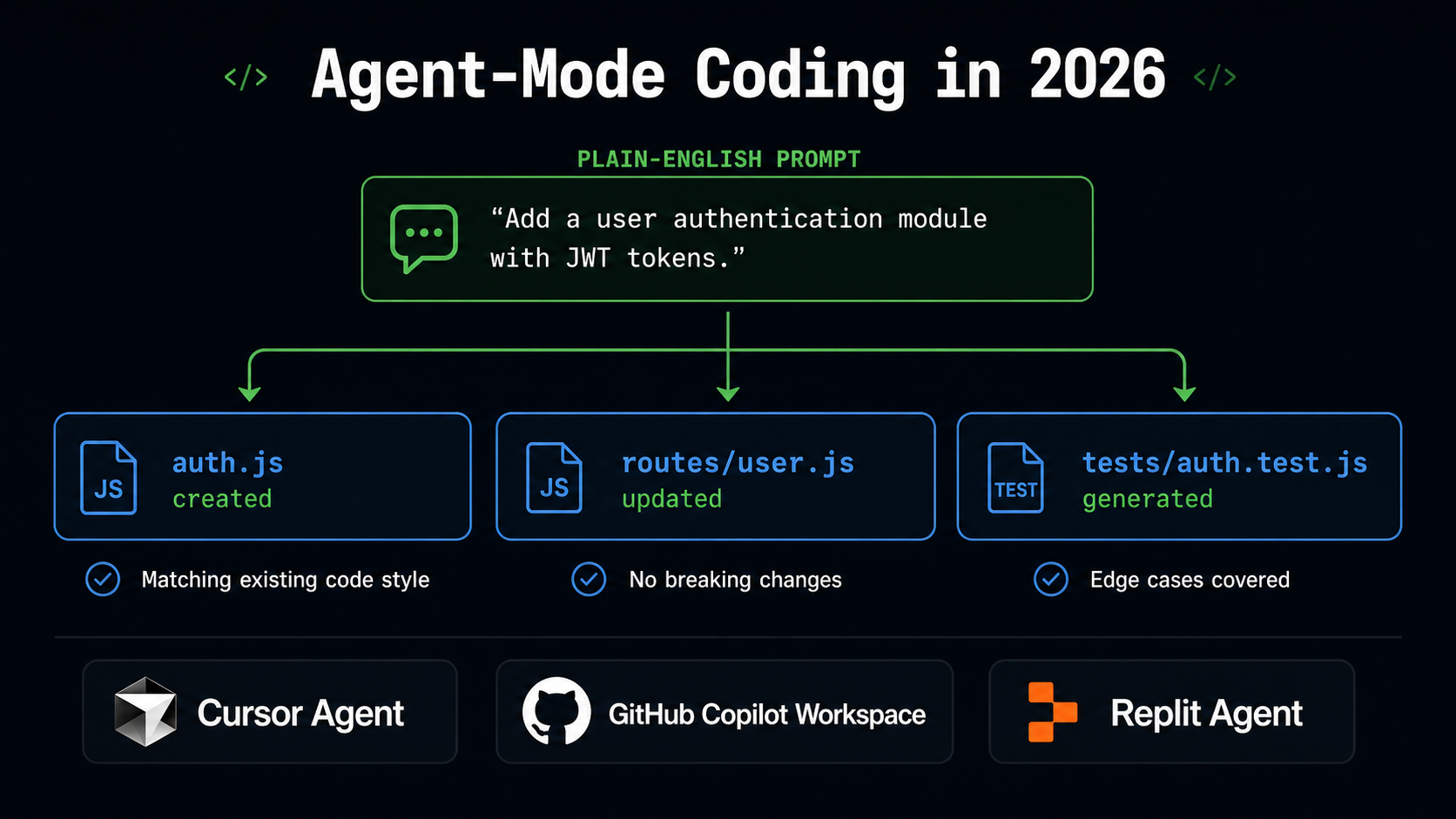
Most developers got their first real taste of AI being useful somewhere in the coding stage. And compared to where things started, the tools have moved a long way.
The first version of GitHub Copilot was genuinely handy. It filled in lines, finished functions, occasionally produced something you would not have written yourself but was actually better. Still, it was autocomplete. Smart autocomplete, but autocomplete. You were still doing most of the driving.
What is different now is that agent-mode tools do not just complete what you are typing. You describe the goal. You write out what the feature needs to do, point the agent at your repo, and it actually digs in. It reads your code, picks up how you name things, sees what is already built, and comes back with something that works across all the files that need changing. Not a skeleton. An actual working draft.
You still sit with the output. You go through it carefully, run the tests, push back where something does not line up with how you think about the problem. None of the judgment moves away from you. But the mechanical part, translating a clear plan into a working scaffold with all the boilerplate written out, that is handled.
If you work solo or do freelance work, this changes your day in a real way. Something that used to eat two full days, scaffolding, database queries, API layer, validation wiring, all of it, can have a working first draft sitting in front of you inside an hour. That is not a small efficiency gain. That is a different rhythm entirely.
Two-person teams that used to ship one big feature per sprint are now getting two or three out the door. The ceiling on what a small group can actually build has shifted somewhere noticeably higher.
If you want to sharpen the underlying skills that make this kind of workflow actually hold together, the Software Development resources on Web Designer Hub have solid full-stack guides that complement what the AI tooling does well.
STAGE 3: Testing and QA Without the Bottleneck
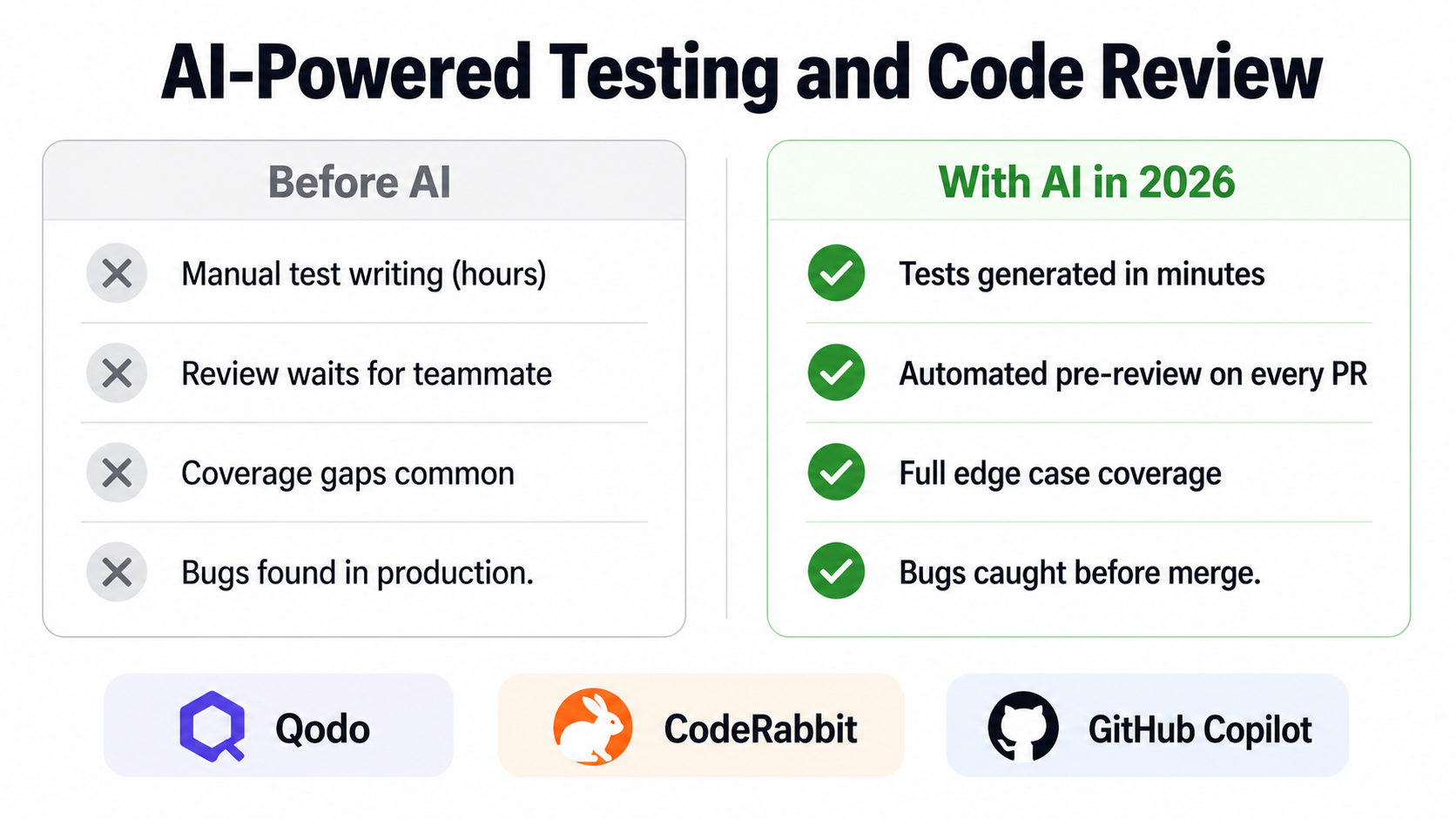
Testing is where good momentum goes to stall. Nobody sits down excited to write test suites, and when a deadline is close, that work slides to the bottom of the list fast. Then three weeks later a bug surfaces in production that a thirty-second test run would have caught, and you spend a day tracking it down instead.. It is one of those cycles that everybody knows and almost nobody fully solves.
The tools have changed that calculus a bit. With Qodo and GitHub Copilot generating coverage from your existing code, you are not starting from a blank file anymore. Point the tool at a function and it gives back a test suite. Main paths covered, edge cases included, things you would have skipped under pressure are in there too. What used to be an afternoon task is done before your coffee gets cold. You read through it, fix what is off, add anything the tool missed. Working from something is a fundamentally different experience than building from scratch.
The review side has shifted too. Tools like CodeRabbit sit directly inside GitHub and GitLab and do a full pass on your pull request before a human ever opens it. They read the diff, compare it against the broader codebase, flag logic that looks wrong, surface potential security issues, suggest places where the approach could be cleaner. By the time your actual reviewer sees the PR, the obvious stuff is already handled. Their time goes toward the calls that genuinely need human judgment rather than catching things a tool could have spotted automatically.
Running both of those, you end up with QA that does not function as a wall at the end of everything. Code moves from written to reviewed to shipped faster, with better coverage than most teams managed when they were doing it all manually, and with more confidence about what is actually going out the door.
STAGE 4: Deployment: The Last Manual Bottleneck, Now Solved
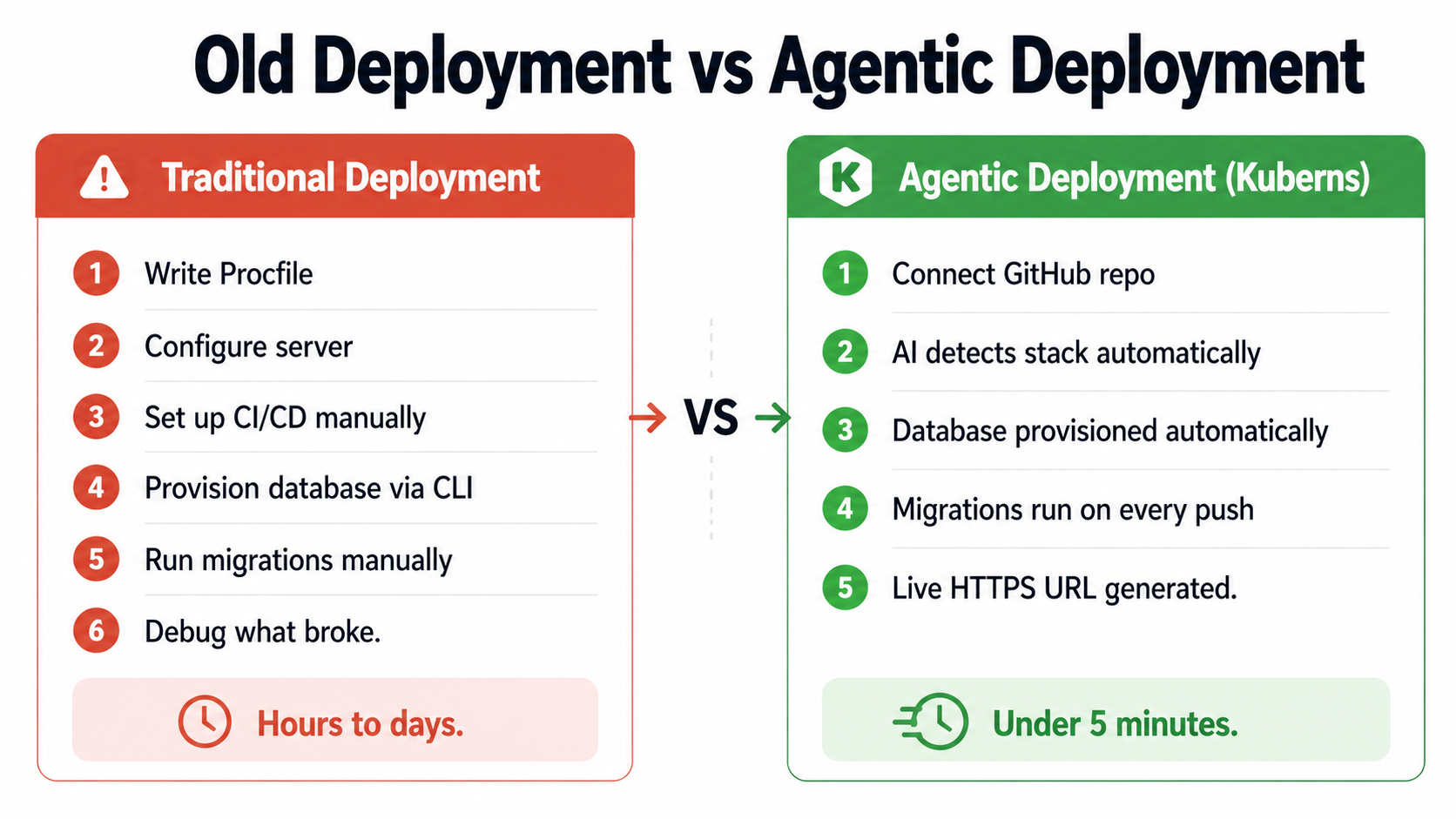
This is the part that catches people off guard the first time they ship something. The feature is done. Tests passed. The PR got approved and merged. Surely that means you are finished? Then it hits you. Server setup. Dockerfile. CI/CD pipeline. Database provisioning. Environment variables. Migrations. HTTPS. And somewhere in that pile something will go sideways in a way that costs you the rest of the day. For anyone who did not come up through DevOps or infrastructure work, this can easily eat as much time as the feature itself.
The phrase “done coding” and the moment real users can actually open the thing have never meant the same thing. That gap is where agentic deployment platforms have made the most direct, practical difference in 2026.
Kuberns handles the configuration layer through AI agents. You connect your GitHub repository and it takes things from there. It reads the project, figures out the framework and runtime by itself, sets the correct build commands, provisions a managed database if the app needs one, runs migrations automatically on every deploy, sorts out HTTPS, and sets up a CI/CD pipeline that runs every time you push to main. Your first deployment is live in under five minutes. Every one after that fires automatically when you push. You finish the feature, push the code, and it is live. That is genuinely the whole process.
Finish a feature and it is in front of users in the same working session, with no context switch to a terminal, no config file to stare at, no deployment ceremony to manage. For a proper breakdown of how agentic deployment compares across different platforms and stacks, the best PaaS providers comparison for 2026 covers exactly what changes when the infrastructure layer is AI-managed.
For teams who used to treat deployment as something requiring its own specialist knowledge and preparation, the shift here is significant. It becomes a side effect of pushing code rather than its own separate project.
STAGE 5: After Launch, When The Real Shipping Starts
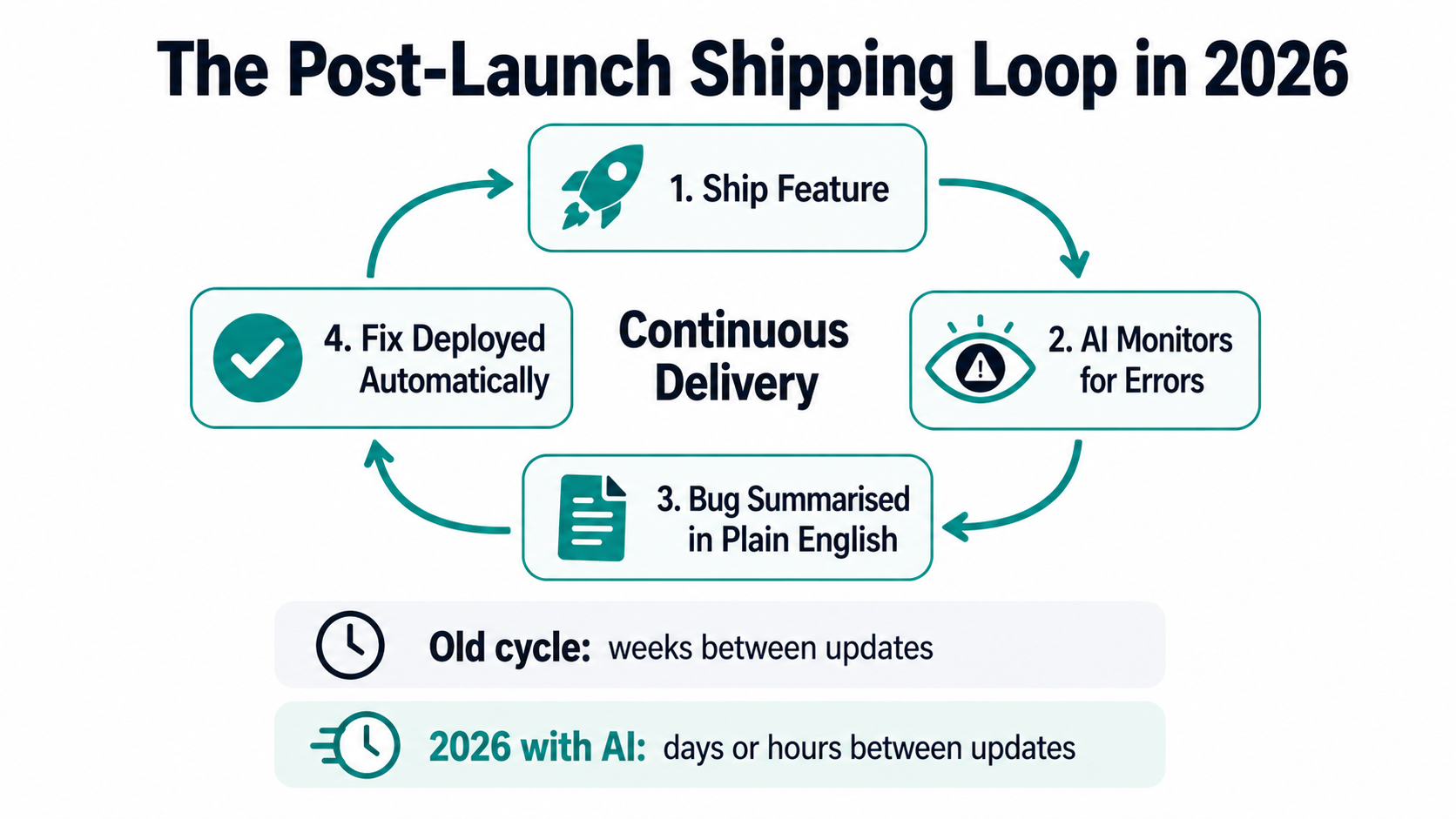
Going live is not the finish line. Going live is really just the moment you start finding out if the thing actually works for people. Bug turnaround, how fast the next feature lands, how well you adapt to what real users do, that is the stuff that decides whether a launch goes anywhere.
With the CI/CD pipeline from the deployment stage already running, every feature that comes after launch follows the same path. Write it, push it, it goes live. No ceremony, no separate deployment session, no checklist to work through. Teams that used to ship once a month are shipping weekly. Teams that were already shipping weekly are going multiple times a week.
Monitoring and debugging have gotten better too. Tools like Sentry AI and Datadog’s AI assistant take raw error reports and turn them into something you can actually read quickly. Related issues get grouped, likely causes get flagged based on what changed recently in the code, and in some cases a suggested fix comes with it. Something that used to mean an hour of log-diving can often be understood in a few minutes now.
The whole loop runs faster. User hits a problem, team hears about it sooner, fix goes out quicker, product gets better. The gap between someone’s first complaint and a working fix has gone from days to hours for teams running a proper AI-assisted pipeline end to end.
Web Designer Hub covers this space closely across development, design, and deployment. If you want to contribute, the write-for-us page is at https://www.webdesignerhub.org/write-for-us/.
What This Means for Developers in 2026
Speed is the headline people reach for, but it actually sells the change short. The bigger thing is what it has done to the ceiling. A single developer with a proper AI workflow can take a product from idea to live and keep iterating on it at a pace that would have required four or five people three or four years ago. That is not a productivity tip. That is a structural change in what small teams can realistically attempt.
The skills that pay off have shifted too. Raw coding speed matters less than it used to. What matters more is knowing which tool fits which stage, how to give it direction that actually works, and how to read its output with a critical eye rather than just shipping whatever it hands back. Architecture thinking matters more now, not less, because the bottleneck is no longer the mechanical work. It is the judgment calls, and those still require a human who actually understands the system.
Security is worth saying out loud here because it gets lost in the excitement. AI tools write working code. They do not always write safe code. That distinction is still entirely on the developer. An AI wrote the draft. You shipped it. That is on you, same as always.
The developers actually moving fast right now are not always the most experienced people in the room. A lot of them just took the time to wire together a proper workflow across all five stages and stuck with it. From the first spec conversation to watching something go live. It clicks pretty quickly once you start, and the output keeps surprising you.
FAQs
Q: What AI tools help developers ship software faster in 2026?
Honestly, the useful ones are spread across the whole pipeline rather than sitting in one place. For planning and writing specs, most people are using Claude or ChatGPT. For actual coding, Cursor Agent and GitHub Copilot Workspace do the heavy lifting. Qodo and CodeRabbit handle test generation and pre-review. Kuberns takes care of deployment through AI agents. Sentry AI and Datadog handle monitoring after things go live. No single tool covers the whole thing, but once you have them all connected across the pipeline, the difference in pace compared to the old way is pretty hard to argue with.
Q: Can AI replace the software testing and QA process entirely?
Not a chance, and honestly you would not want it to. Qodo and GitHub Copilot are solid at generating coverage fast and catching the obvious issues without you having to babysit the process. But there is a layer of testing that still needs a person. Validating that the business logic actually does what the business needs it to do. Thinking through edge cases that only make sense if you understand how real people use the product. Doing security testing that requires knowing what the application is actually supposed to protect. AI handles the mechanical parts well. The quality decisions are still yours.
Q: What is the fastest way to deploy a web app without DevOps experience?
If you do not have a DevOps background and honestly have no interest in building one, agentic deployment is the answer right now. Kuberns reads your repository, works out the stack by itself, provisions the database, sets up HTTPS and CI/CD, and handles migrations on every push. A full-stack app goes from a GitHub repo to a live URL in under five minutes without touching a config file or a terminal. If your goal is to ship without spending a week learning infrastructure, that is the most direct path available.
Q: How are small development teams using AI to compete with larger companies?
By squeezing time out of every stage. Planning is faster, coding is faster, test generation is automated, deployment is automatic, monitoring catches issues faster. Output per developer has gone up significantly. A two-person team running this kind of workflow can ship at a pace that used to need five or six people, which chips away at the headcount advantage larger companies used to count on.
Q: What does an AI-accelerated software development workflow look like end to end?
It starts with an AI assistant helping turn a rough idea into a spec and an architecture plan. Then agent-mode coding tools handle the implementation work across the codebase. AI-generated tests cover the new code before anyone reviews it. An automated review agent runs through the pull request before a human looks at it. An agentic deployment platform ships the code when it merges. AI-powered monitoring watches what happens after launch. Each step flows into the next without a lot of manual work between them, and that handoff time is where most of the savings actually come from.

- How to Choose the Right IVR Service Provider for Your Small Business

- How Developers Are Shipping Software Faster With AI in 2026
- Building a Secure ID Scanner App for Age-Restricted Retail
- How Custom Plugins Can Improve WordPress Website Performance
- UX vs Marketing: What Really Drives User Engagement?