Building a Secure ID Scanner App for Age-Restricted Retail
Age verification at the point of sale is a legal obligation for retailers selling alcohol, tobacco, cannabis, and other age-restricted products. Failing to verify a customer’s age correctly exposes the business to fines, license suspensions, and reputational damage. Yet the verification tools that a majority of retailers rely on today, primarily manual inspection of physical documents by staff, are slow, inconsistent, and heavily dependent on individual judgment under real-world conditions such as low lighting, customer pressure, and high transaction volumes.
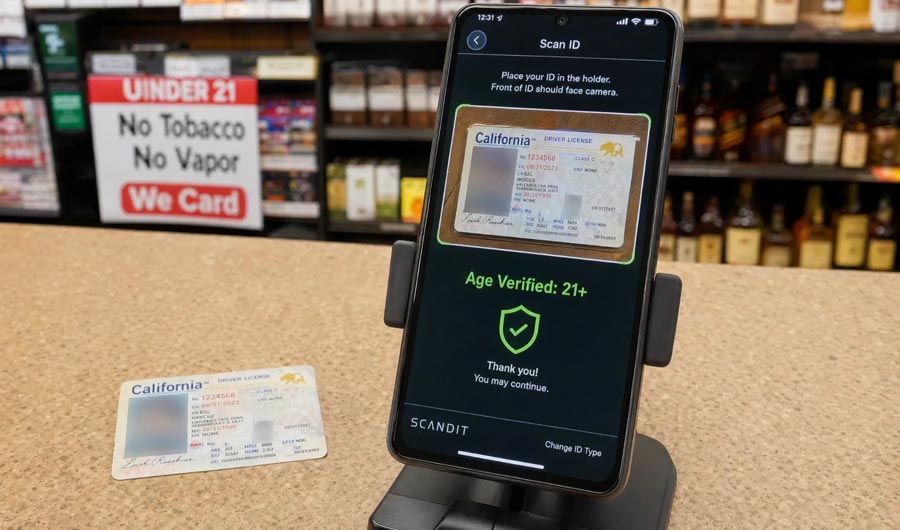
A purpose-built ID scanner app addresses these limitations by automating the document reading and age calculation steps entirely. The staff member no longer needs to interpret a date of birth visually and perform mental arithmetic to determine eligibility. The app reads the document, calculates the customer’s age against the current date, and returns a clear pass or fail result in under three seconds.
What Is an ID Scanner App for Age-Restricted Retail?
An ID scanner app for age-restricted retail is a mobile or fixed-terminal application that uses optical character recognition (OCR) and document parsing to extract date-of-birth information from government-issued identity documents and determine whether the holder meets the minimum age requirement for a given product category. In other words, it converts the manual inspection process into an automated verification step that takes less time and eliminates human calculation errors.
A complete solution typically handles several document types. The most highly demanded options are national ID cards, driver’s licenses, and passports, all of which contain date-of-birth data in standardized field positions or in the Machine Readable Zone (MRZ), the two-line encoded strip at the bottom of passports and some ID cards that follows an internationally standardized format.
Apart from age calculation, a well-designed app may also check basic document authenticity indicators, such as whether the document’s expiry date is valid and whether the data in the MRZ is internally consistent with the visible fields. These additional checks help flag obviously invalid documents without requiring a full forensic verification pipeline.
Core Technical Components
Building a reliable ID scanner app requires several functional layers working together. Understanding these components helps development teams make informed decisions about which to build in-house and which to source from an SDK.
Document Capture and Image Quality Assessment
The recognition pipeline begins with a stable, well-framed image of the document. The app should guide the user to position the document correctly within the camera frame and assess image quality before triggering recognition. Blurred images, significant glare from laminate surfaces, or documents captured at steep angles will reduce OCR accuracy. An image quality assessment layer like Proctortrack Demo that requests a retake before processing prevents unnecessary recognition failures.
OCR and Field Extraction
The OCR engine reads the text from the captured image and maps it to known field positions for the identified document type. For date-of-birth extraction, this means locating the correct field based on the document template for the identified country and document version. MRZ parsing is particularly reliable because the character set and field positions in the MRZ are internationally standardized, which makes the data extraction step consistent across document types from different countries.
Age Calculation and Result Logic
Once the date of birth is extracted, the app calculates the customer’s current age by comparing the extracted date against the device’s current date. The result is evaluated against the configured age threshold for the product being sold. The app should support configurable thresholds because age requirements vary by product category and jurisdiction. Selling alcohol may require a minimum age of 18 in one market and 21 in another, and the same app may need to handle both.
Audit Logging
Every verification event should generate a log entry that records the document type, the verification result, the timestamp, and the staff member or terminal identifier. This log serves as evidence that the retailer performed the required check at the time of sale. Audit logs are frequently requested during license compliance reviews and regulatory inspections, and their absence can be treated as evidence of non-compliance even when no sale to a minor actually occurred.
Where an ID Scanner App Makes the Most Difference
Not every retail context presents the same level of risk or the same operational constraints. The following scenarios represent the highest-value applications for automated age verification.
High-Volume Off-Licence and Convenience Retail
Off-licences, convenience stores, and supermarket alcohol sections process large numbers of transactions under time pressure. Staff are often junior and may have limited experience interpreting documents from multiple countries. Here is when an ID scanner app can enter the game most effectively: it removes the judgment call from the transaction entirely and replaces it with a consistent, auditable check that takes the same amount of time regardless of the staff member performing it.
Cannabis Dispensaries
Licensed cannabis dispensaries in jurisdictions where adult-use cannabis is legal face strict compliance requirements around age verification at every transaction. Manual inspection of documents is required by law in a majority of these jurisdictions, but automated scanning can satisfy this requirement while reducing queue times and human error. Audit logs generated by the app provide the transaction-level compliance evidence that regulators may request.
Online Age-Gated Delivery
Alcohol and tobacco delivery services need to verify customer age at the point of delivery, not only at the point of purchase. A mobile app used by delivery staff to scan the recipient’s document at the door addresses this requirement. Thanks to mobile deployment, the same verification capability can be applied consistently across an entire delivery fleet without requiring dedicated hardware at each driver’s location.
Vending Machine Integration
Age-gated vending machines for tobacco, alcohol, and similar products may integrate with a document scanning module to verify age before dispensing. In this context, the scanning capability functions as an embedded component rather than a staff-operated app, but the underlying OCR and age calculation logic is identical.
Also read: The Future of Mobile App Development: Trends and Predictions
What a Reliable ID Scanner App Should Have
Security, accuracy, and compliance are the three dimensions that matter most for age verification in a regulated retail context. The following criteria define a production-ready solution.
- Multi-country document support. The app should recognize and correctly parse documents from all countries represented in the retailer’s customer base. You should attentively analyze whether the solution covers the specific document types most common in the target market, not only the most widely recognized international formats.
- MRZ parsing as a primary extraction method. MRZ data is significantly more reliable than visual field OCR because the character set is standardized and error-correction is built into the format. Solutions that prioritize MRZ reading will deliver higher accuracy than those relying solely on visual field recognition.
- Configurable age thresholds by product category. The app should allow different age thresholds to be configured for different product types so that a single deployment can support a retailer selling both alcohol and tobacco in markets with different legal minimums for each.
- On-device processing. Document images and extracted personal data should not be transmitted to external servers during verification. We recommend verifying this in the vendor’s technical documentation, as data minimization is both a privacy best practice and a likely regulatory requirement in a majority of jurisdictions.
- Tamper-evident audit logs. Log entries should be write-once and time-stamped in a format that cannot be altered after the fact. This is essential for using the logs as compliance evidence.
- Offline operation capability. Retail environments may have unreliable internet connectivity. The app should perform all verification functions locally without requiring a network connection.
How to Build a Secure ID Scanner App for Age-Restricted Retail
Development teams approaching this problem have two broad paths: integrating a specialist document scanning SDK and building the retail-specific application logic around it, or attempting to build the full OCR and document parsing pipeline from scratch. The majority of teams find that using a specialist SDK for the recognition layer and building the product logic on top of it is the faster and more reliable approach.
- 1. Select a document scanning SDK with strong MRZ and multi-country support. Evaluate the SDK’s accuracy on the document types most relevant to the target market. It will be helpful to request a trial integration and test against real documents rather than relying solely on published benchmarks.
- 2. Design the age threshold configuration system. Build a configuration layer that allows product category age thresholds and supported jurisdiction rules to be updated without requiring a new app release. This is important because legal requirements change and the app needs to remain compliant without a full redevelopment cycle.
- 3. Implement audit logging with tamper protection. Store log entries locally with a cryptographic hash that allows any modification to be detected. Include synchronization to a secure backend when connectivity is available, so that logs are not lost if a device is damaged or replaced.
- 4. Build a clear and fast staff UI. The verification result should be displayed as a large, unambiguous pass or fail indicator that is readable under varied lighting conditions. The entire flow from scan trigger to result display should complete in under five seconds under normal operating conditions.
- 5. Test compliance with local regulations before deployment. Age verification requirements vary significantly across jurisdictions, including which documents are acceptable, what constitutes a valid verification, and what records must be kept. We recommend reviewing applicable legal requirements with a compliance advisor before finalizing the app’s verification logic.
Also read: On-Demand Apps for Every Industry: The Ultimate Guide
Conclusion
Building a secure ID scanner app for age-restricted retail means combining accurate document recognition with reliable age calculation, configurable compliance rules, and tamper-evident audit logging, all in a design that staff can operate quickly under real retail conditions. The technical foundation is best built on a specialist document scanning SDK that handles MRZ parsing and multi-country document recognition, with retail-specific logic layered on top.
The investment in a well-designed automated solution pays for itself through reduced compliance risk, consistent verification quality across all staff and locations, and audit-ready records that demonstrate due diligence. These mechanics boost the retailer’s defensibility in regulatory inspections and reduce the likelihood of license-threatening compliance failures caused by human error at the point of sale.

- How to Choose the Right IVR Service Provider for Your Small Business

- How Developers Are Shipping Software Faster With AI in 2026
- Building a Secure ID Scanner App for Age-Restricted Retail
- How Custom Plugins Can Improve WordPress Website Performance
- UX vs Marketing: What Really Drives User Engagement?